
Getting the Best Results from AI-Generated Artwork for Laser Engraving
Artificial Intelligence (AI) is a fantastic tool for creating custom artwork, but not all AI-generated images are suitable for laser engraving. If you're using AI to create a design for engraving, a few simple adjustments to your prompt can dramatically improve the final result and reduce the need for artwork cleanup.
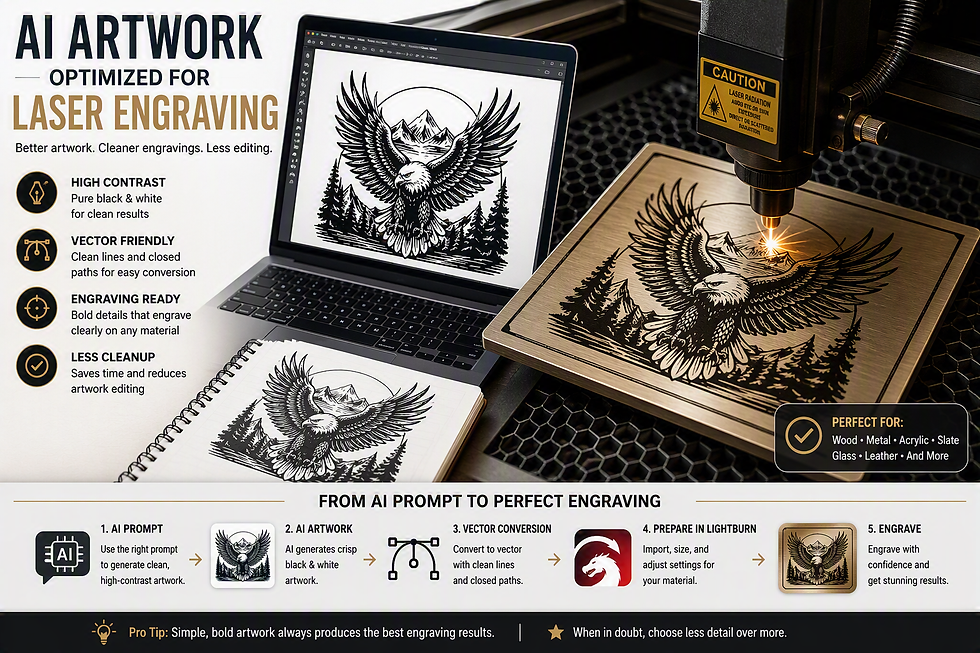
What Makes Artwork Engraving-Friendly?
Laser engravers work best with designs that have:
High contrast
Clean, bold outlines
Simple, well-defined details
Minimal background clutter
Black-and-white artwork
Images that contain gradients, shadows, heavy textures, or excessive detail may not engrave as clearly as expected and often require additional editing before production.
Recommended AI Prompt
To create artwork that's easier to engrave, try using the following prompt in your favorite AI image generator:
1 Create professional laser engraving artwork of [SUBJECT].
2
3 The design must be optimized for laser engraving and vector conversion. Use only pure black and pure white. No grayscale, gradients, shadows, glow effects, transparency, or photographic textures. Use bold clean lines, simplified shapes, high contrast, closed paths, and balanced detail. Generate commercial-quality vector-style artwork with a white background and minimal cleanup required.
For Plaques, Awards, and Signs
If you're designing artwork for a plaque, memorial, military award, or sign, consider adding details such as:
1 Professional appearance
2 Symmetrical layout
3 Bold clean outlines
4 High contrast black and white
5 Suitable for laser engraving
6 Vector-style artwork
These instructions will help create artwork that engraves more cleanly and produces a professional finished product.
Converting Photographs
For portraits or photo engravings, use a prompt like this:
Plain Text
1 Convert this photo into a laser engraving ready image.
2
3 Requirements:
4 - Pure black and white
5 - Strong edge definition
6 - Preserve important facial features
7 - Remove unnecessary background details
8 - Suitable for laser engraving
9 - Clean vector-like appearance
Vector Artwork Is Always Preferred
Whenever possible, request:
1 Create vector artwork suitable for laser engraving.
or
1 Output in SVG format with closed paths suitable for laser engraving.
Vector artwork typically produces the sharpest results and often requires the least amount of preparation before engraving.
A Few Final Tips
To ensure the highest quality engraving:
Use simple, high-contrast artwork whenever possible.
Avoid gradients and shadows.
Minimize overly fine details.
Request vector-style designs.
Submit the highest-resolution image available.
Following these guidelines helps us produce cleaner engravings, sharper details, and better overall results on wood, metal, acrylic, slate, glass, and other engraved products.
If you're unsure whether your artwork is suitable for engraving, feel free to send it to us. We're always happy to review your design and recommend any adjustments that may improve the final result.
Comments